[wesbos30] 02. Clock
![[wesbos30] 02. Clock](https://firebasestorage.googleapis.com/v0/b/cruz-lab.firebasestorage.app/o/images%2Fheroes%2Fhero-1764833088169.webp?alt=media&token=67217290-4eec-428e-a580-5c7448505a01)
💡 CSS와 JavaScript를 활용하여 간단한 아날로그 시계를 만들어보았다.
로직
- 현재 시간을 시, 분, 초 별로 받아옴 (
new.Date(),getSeconds(),getMinutes(),getHours()) - 각 침이 시간이 지날때마다 몇 도씩 움직여야할지 계산
- 위의 계산결과를 토대로 각 침을 회전시키도록 설정 (
rotate()) - 1초 간격으로 함수를 주기적으로 실행 (
setInterval()) - 실제 시계처럼 틱틱 거리게 CSS 추가
코딩 과정
1. 현재 시간 받아오기
function clock() {
  const now = new Date()
  const seconds = now.getSeconds()
  const mins = now.getMinutes()
  const hours = now.getHours()
}
먼저 현재 시간을 받아오기 위해 Date 객체를 사용한다.
Date 객체
const now = new Date()
Date 객체는 시간의 특정 지점을 나타내며, 시간과 관련된 메서드도 제공해주는 내장 객체이다.
new Date()를 호출하면 새로운 Date 객체가 만들어진다.
💡 새로운 Date 객체를 생성하는 방법은 new 연산자를 사용하는 것이 유일하다. now = Date()처럼 Date를 직접 호출하면 새로운 Date 객체가 아니라 문자열을 반환!!
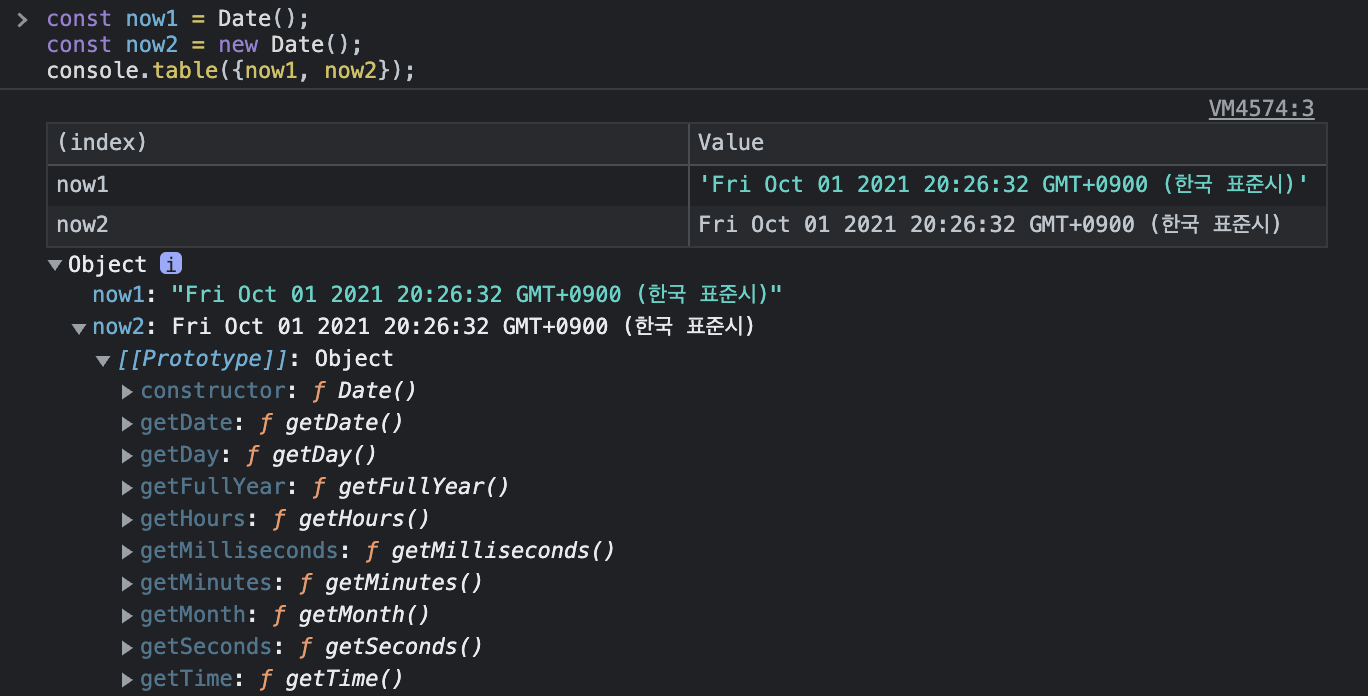
new Date()를 호출하여 새로운 Date 객체를 생성한 now2와 달리
그냥 Date()를 호출한 now1은 시간을 단순한 문자열로 반환한 것을 확인할 수 있다.
시, 분, 초 받아오기
const now = new Date()
const seconds = now.getSeconds()
const mins = now.getMinutes()
const hours = now.getHours()
시, 분, 초를 받아오기 위한 메서드는 다음과 같다.
-
getHours() : Date에서 현지 시간 기준 시(0–23)를 반환합니다.
-
getMinutes() : Date에서 현지 시간 기준 분(0–59)을 반환합니다.
-
getSeconds() : Date에서 현지 시간 기준 초(0–59)를 반환합니다.
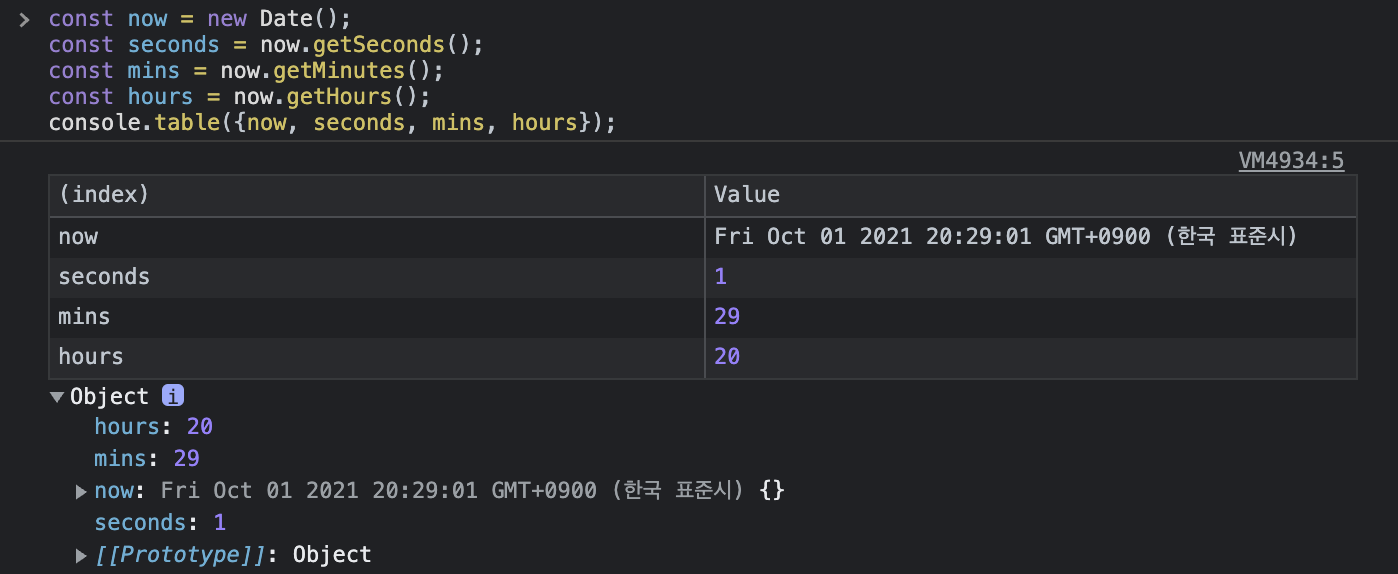
각 항목을 console에 찍어보면 다음과 같다. (10월1일 금요일 오후 8시 29분)
2. 시간에 따른 침 각도 계산
const secondsDegree = (seconds / 60) * 360 + 90
const minsDegree = (mins / 60) * 360 + (seconds / 60) * 6 + 90
const hoursDegree = (hours / 12) * 360 + (mins / 60) * 30 + 90
초침 각도 계산
const secondsDegree = (seconds / 60) * 360 + 90
초침은 60초 기준 360도를 회전하므로 아래와 같은 비례식이 성립한다.
seconds : degree = 60s : 360deg
따라서 degree = (seconds/60) * 360 이다.
⚠️ 이 때 기본 CSS 설정에서 침이 12시를 가르키게 하기위해 90deg를 회전시켜놓은 상태이므로 이를 맞춰주기 위해 JavaScript에서 계산할 때도 모든 침의 각도에 90deg를 더해준다!
분침 각도 계산
const minsDegree = (mins / 60) * 360 + (seconds / 60) * 6 + 90
분침은 60분 기준 360deg를 회전하므로
degree = (mins/60) * 360 이다.
여기에 추가로 초 경과에 따른 분침 각도를 계산하면
분침이 60초 기준 6deg를 회전하므로
(seconds / 60) * 6 만큼 더해주면 된다.
시침 각도 계산
const hoursDegree = (hours / 12) * 360 + (mins / 60) * 30 + 90
시침은 12시간 기준 360deg 회전하므로
degree = (hours / 12) * 360) 이다.
분 경과에 따른 시침 각도를 계산하면
시침이 60분 기준 30deg를 회전하므로
(mins / 60) * 30 만큼 더해준다.
3. 각도 계산 결과에 따라 침 회전시키기
const secondHand = document.querySelector('.second-hand')
const minHand = document.querySelector('.min-hand')
const hourHand = document.querySelector('.hour-hand')

function clock() {
  const now = new Date()
  const seconds = now.getSeconds()
  const mins = now.getMinutes()
  const hours = now.getHours()

  const secondsDegree = (seconds / 60) * 360 + 90
  const minsDegree = (mins / 60) * 360 + (seconds / 60) * 6 + 90
  const hoursDegree = (hours / 12) * 360 + (mins / 60) * 30 + 90

  secondHand.style.transform = `rotate(${secondsDegree}deg)`
  minHand.style.transform = `rotate(${minsDegree}deg)`
  hourHand.style.transform = `rotate(${hoursDegree}deg)`
}
각 침을 상수로 선언한 후 style로 위에서 계산한 각도 만큼 rotate 시켜준다.
4. 함수의 주기적 실행
setInterval(clock, 1000)
이제 실제로 시계를 작동시키기 위해 setInterval() 메서드를 사용하여 1초마다 함수가 실행되도록 한다.
setInterval()
setInterval(func, delay, arg1, arg2 , ...)의 형태로 사용하며 함수를 일정한 주기로 반복 실행시켜준다
💡 setInterval로 시계처럼 작동하게 만들었지만 페이지를 새로고침해보면 지정해준 주기가 지나고 나서야 첫 함수가 실행되는것을 확인할 수 있다.
따라서 clock() 코드를 추가하여 함수가 페이지를 열자마자 바로 실행되도록 한다!
5. 실제 시계처럼 틱틱거리게 하기
.hand {
  /* 기존 코드 생략 */

  transition: all 0.05s;
  transition-timing-function: cubic-bezier(0.1, 2.7, 0.58, 1);
}
실제 시계처럼 침이 움직일때 틱틱 거리는 효과(원래 움직여야할 범위보다 살짝 더 움직인 후 다시 돌아오는 효과)를 주기위해 CSS transition에 속성을 추가해준다.
transition-timing-function
transition-timing-function으로 transition의 진행 속도를 조절할 수 있다.
기본적으로 ease, linear, ease-in, ease-out, ease-in-out 5개의 값이 선언되어 있고
cubic-bezier를 사용하면 진행 속도를 직접 설정 가능하다.
https://cubic-bezier.com/#.17,.67,.83,.67에서 눈으로 확인해 볼 수 있다.
최종 완성 코드
const secondHand = document.querySelector('.second-hand')
const minHand = document.querySelector('.min-hand')
const hourHand = document.querySelector('.hour-hand')

function clock() {
  const now = new Date()
  const seconds = now.getSeconds()
  const mins = now.getMinutes()
  const hours = now.getHours()

  const secondsDegree = (seconds / 60) * 360 + 90
  const minsDegree = (mins / 60) * 360 + (seconds / 60) * 6 + 90
  const hoursDegree = (hours / 12) * 360 + (mins / 60) * 30 + 90

  secondHand.style.transform = `rotate(${secondsDegree}deg)`
  minHand.style.transform = `rotate(${minsDegree}deg)`
  hourHand.style.transform = `rotate(${hoursDegree}deg)`
}

setInterval(clock, 1000)
clock()